Sewing Vector AI Frill Pattern Brushes: A Designer's Guide
There's a certain tactile quality to fabric that digital design often misses. The way a ruffle catches the light, the precise fold of a pleat, the delicate edge of lace—these details evoke craft, care, and a handmade aesthetic. For designers and creators looking to inject that textile-inspired charm into their vector work, specialized tools can make all the difference. Enter Sewing Vector AI Frill Pattern Brushes, a comprehensive toolkit designed to bring the intricate artistry of needlework directly into Adobe Illustrator.
What Exactly Are These Pattern Brushes?
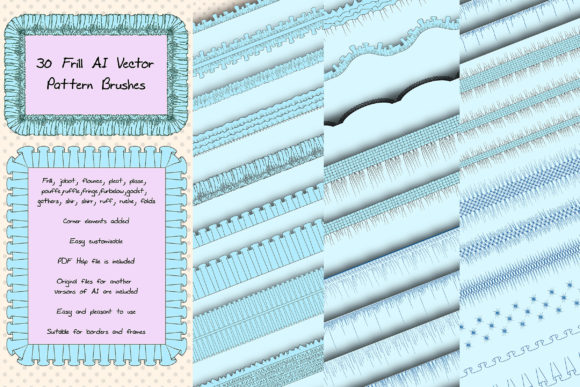
At their core, these are vector brushes that simulate sewing and textile decorations. Imagine a library of 31 distinct styles, each one a digital interpretation of a real-world fabric element: frills, jabots, flounces, pleats, ruffles, fringes, and more. They function as Adobe Illustrator brushes, meaning you can apply them to any vector path—a straight line, a curved shape, or a complex outline. The brush automatically tiles or stretches the pattern along that path, creating a seamless, editable decorative border or fill.
The visual personality is distinctly craft-oriented. It's not a modern sans serif or a elegant script font; it's a collection of decorative elements with a strong, textured character. The style leans toward the ornate and whimsical, perfect for projects that need a touch of handmade warmth, vintage flair, or elaborate detail. Think of it as a design asset for adding a specific, high-fidelity decorative language to your work.
Where Do These Brushes Shine?
The applications for such a niche toolkit are surprisingly broad, especially for creators in certain fields. Here’s where Sewing Vector AI Frill Pattern Brushes become particularly valuable:
- Branding & Logo Design: For boutique businesses, craft stores, textile companies, or fashion labels, these brushes can help create a unique brand identity. A subtle frill border on a business card or a ruffled underline in a logo can instantly communicate a brand’s handmade, luxurious, or vintage personality.
- Packaging Design: Product packaging for artisanal goods, cosmetics, or specialty foods often benefits from decorative elements that suggest quality and care. These brushes are ideal for creating eye-catching borders and embellishments that stand out on the shelf.
- Editorial & Publishing: Editorial design for magazines, lookbooks, or children's books can use these patterns to frame images, decorate chapter headings, or add thematic touches to layouts. They offer a way to move beyond standard serif font or sans serif font typography and integrate graphic textile elements.
- Digital Content & Social Media: Social media graphics, blog headers, and website banners can use these brushes to create unique dividers, borders, and decorative text treatments. They help content stand out in a crowded feed with a distinct, artisanal visual style.
- Craft & Hobby Projects: For hobbyists and crafters selling digital or physical products, these brushes are a direct path to creating professional-looking designs for invitations, scrapbooking elements, or print-on-demand items.
Practical Guidance for Effective Use
Before diving in, it’s wise to approach any new design asset with a strategy. Here’s how to evaluate and implement these brushes effectively:
Evaluating Project Fit
First, consider if the brush style aligns with your project’s tone. The elaborate nature of frills and ruffles communicates specific messages: femininity, tradition, luxury, or playfulness. They are less suited for a corporate financial report but perfect for a wedding stationery suite or a bakery’s menu. Always test the brushes on a small section of your design to ensure the scale and detail work with your overall layout.
Understanding the Toolkit
The package includes 31 pattern brushes, which is a significant library. Don't feel pressured to use them all. A strong design often uses one or two key decorative elements consistently. Explore the variety—perhaps a fine pleat for subtle texture and a bold ruffle for emphasis. The included corner elements are crucial for creating clean, professional-looking rectangular frames and borders, ensuring patterns meet seamlessly at angles.
Technical Considerations
Compatibility is key. These brushes are designed for Adobe Illustrator CS5 and above, and the included Ai and EPS 10 files offer a fallback for older versions or alternative software. The PDF help file is invaluable for beginners, offering screenshots that guide you through loading and applying the brushes. Remember, as vector elements, they are infinitely scalable—you can change their color, size, or thickness without losing quality, giving you full creative control.
Pairing and Readability
The biggest challenge with highly decorative elements is maintaining readability and a clear visual hierarchy. These brushes should be accents, not the main text. Pair them with clean, legible typefaces. A bold, simple display font for headlines can balance the complexity of a frill border. For body text, a straightforward modern typography choice like a neutral sans serif ensures your message remains clear. The goal is to let the sewing brushes enhance, not overwhelm, your core content.
Licensing and Professional Use
For designers and entrepreneurs, understanding the license is non-negotiable. Since this is a premium font and asset pack, verify that its license allows for commercial use in your intended projects—whether for a client’s logo, product packaging, or merchandise. This due diligence protects you and your clients professionally.
In practice, these brushes are more than just decorations; they are a bridge to a specific aesthetic. Used thoughtfully, Sewing Vector AI Frill Pattern Brushes can elevate a design from generic to genuinely distinctive, adding a layer of tactile charm that resonates with audiences seeking authenticity and craftsmanship in a digital world. They are a specialized tool, but for the right project, they become an indispensable part of your creative toolkit.