Vector Snowflake Brushes: Effortless Winter Design
There is a specific kind of creative pressure that hits every year around the fourth quarter. Whether you are a freelance designer scrambling to finish client deliverables, a small business owner preparing a holiday campaign, or a crafter setting up a shop on Etsy, the demand for seasonal assets is relentless. You need designs that look intricate and professional, but you likely do not have the time to draw hundreds of individual ice crystals by hand. This is where a solid set of design assets saves the day. I recently integrated a collection of Vector Snowflake Brushes into my workflow, and the difference in efficiency and output quality is substantial.
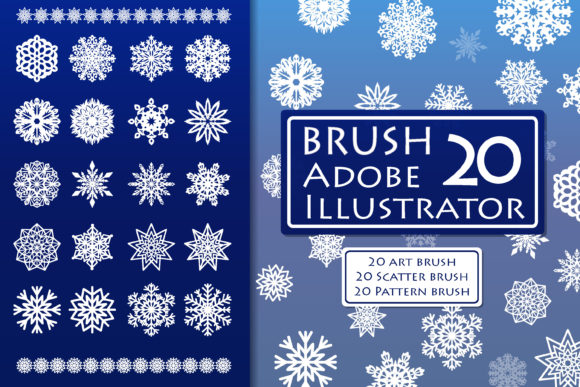
This specific set includes 20 flexible, customizable brushes packaged into a single file for Adobe Illustrator CC. It also includes an A10 file for those running slightly older versions of the software, ensuring broad compatibility. For users who prefer other vector programs or need a quick reference, there is an EPS 10 vector file included as well. The appeal here is not just the variety of the snowflake shapes, but the nature of the tool itself. These are Adobe Illustrator Art Brushes. This means they are not static, stamped images. They are dynamic assets that stretch and conform to whatever path you draw.
The Power of Dynamic Vector Brushes
If you are used to working with standard static graphics, the shift to using brushes changes your approach to graphic design. When you apply one of these snowflake brushes to a path, the snowflake follows the curve. You can draw a swirling line, and instantly, you have a garland of intricate ice crystals. You can draw a perfect circle, and you get a wreath. The "adjustable" nature of these tools is the real value proposition. You aren't locked into a specific size or color.
Imagine you are working on a brand identity for a winter festival. You need a logo element that feels organic and flowing. With these vector snowflake brushes, you can sketch a loose, flowing line to create a unique emblem. Because the result is vector, you have total control over the stroke weight. Need the snowflakes to be larger and bolder for a poster? Increase the stroke size. Need them to be delicate and whisper-thin for a wedding invitation? Decrease the stroke size. This level of customization allows you to maintain a consistent visual hierarchy across different media without needing to redraw assets for every single application.
Real-World Applications and Project Fit
The versatility of this set makes it a practical addition to almost any creative’s toolbox. I have found them particularly effective for packaging design. If you are wrapping a gift box or designing a label for a seasonal product, these brushes allow you to create borders and frames that look hand-drawn yet perfectly precise. The visual personality of the snowflakes is intricate and festive, fitting well into styles ranging from elegant and traditional to playful and modern.
Here are a few specific scenarios where this asset shines:
- Editorial Design & Publishing: If you are a publisher or blogger creating a holiday magazine cover or a blog header, these brushes help you create background textures that don't overpower the typography. They add depth and atmosphere without cluttering the readability of your headlines.
- Apparel and Merchandise: For T-shirt designers, the ability to scale vector art is crucial. You can create a massive back print design using a single brush stroke, ensuring the file remains lightweight and easy to edit for screen printing or DTG processes.
- Stationery and Invitations: Creating a cohesive look for a wedding suite or holiday cards is easier when you can manipulate the brush. You can create a snowflake border that matches the curvature of the paper cutout or envelope flap perfectly.
- Social Media Graphics: In the fast-paced world of content creation, speed matters. You can rapidly generate unique social media graphics for December posts, ensuring your feed looks curated and thematic without spending hours on manual illustration.
Strategic Design and Brand Consistency
One of the biggest challenges in modern typography and design is avoiding the "stock photo" look. When everyone uses the same pre-made snowflake clipart, designs start to blend together. Because these are art brushes, the output depends entirely on the path you create. Two designers using the same brush will likely create completely different designs based on how they draw their lines. This uniqueness is vital for brand recognition.
When evaluating if this set fits your project, consider the font pairing and overall aesthetic. Snowflakes generally pair well with clean sans serif fonts for a modern, minimal winter look, or with elegant script fonts for a more romantic, festive vibe. The brushes act as a display font of sorts—a decorative element that carries the "voice" of the season. They provide the visual flair that draws the eye, while your typography provides the information.
From a technical standpoint, the compatibility is solid. If you are on Adobe Illustrator CC or newer, the native file works seamlessly. The inclusion of the EPS 10 file is a thoughtful touch for those who might use older software or different vector platforms like CorelDRAW or Affinity Designer. It ensures that your investment in these design assets isn't wasted if you switch software environments.
Practical Tips for Implementation
To get the most out of these brushes, don't just use them on straight lines. The magic happens when you use the Pen tool or the Pencil tool to create organic, curving paths. Experiment with the "Width Tool" in Illustrator to vary the thickness of the stroke along the path; this can create a sense of depth, making some snowflakes look closer and others further away.
Also, think about color application. While white and blue are the seasonal standards, don't be afraid to apply these brushes in metallic golds, silvers, or even neon pinks for a more contemporary, pop-art winter aesthetic. Since the result is vector, you can recolor the entire path with a single click, making it easy to A/B test different color palettes for your marketing materials.
Ultimately, this set of Vector Snowflake Brushes is about efficiency and creative freedom. It removes the tedious labor of drawing repetitive winter elements and allows you to focus on composition, color, and messaging. For designers, marketers, and creators who need to produce high-quality winter content quickly, this is a practical, high-value addition to the creative toolkit. It bridges the gap between a raw idea and a polished, professional seasonal design.