Memphis Design Geometric Stamp Procreate: Your Shortcut to 80s Graphic Style
Understanding the Memphis Revival in Digital Design
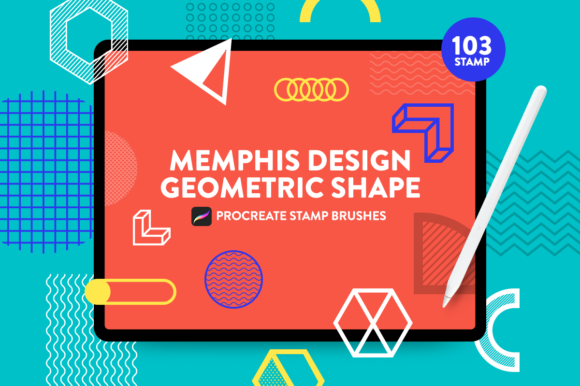
There's a reason why the Memphis Design aesthetic keeps coming back. Its bold, unapologetic use of geometric shapes, clashing patterns, and vibrant colors creates an immediate visual impact that cuts through the noise. The Memphis Design Geometric Stamp Procreate set is essentially a toolkit built around this very principle. It's not a traditional typeface or a single font. Instead, it's a collection of 103 distinct stamp brushes that function as design assets. These aren't just random shapes; they are carefully crafted elements—triangles, squiggles, circles, and abstract forms—that embody the playful yet structured personality of 80s Memphis graphic style.
Think of this set as a visual language. The shapes carry a specific vibe: energetic, retro, and slightly rebellious. Using them in a project immediately injects that personality. They are designed to be intuitive. You choose a color from one of the included palettes—like the Sunrise, Sunset, or Sky color swatches—and simply tap your Apple Pencil on the canvas. This immediacy is their core strength. You're not spending hours drawing perfect geometric outlines; you're composing with pre-built, stylistically consistent elements.
Where Geometric Stamps Shine: Practical Applications
The versatility of the Memphis Design Geometric Stamp Procreate brushes makes them valuable across a wide spectrum of projects. For entrepreneurs and small business owners, these stamps are perfect for creating distinctive brand identity elements. Imagine a logo for a modern cafe or a tech startup that incorporates a single, bold geometric shape as a recognizable mark. The stamps can be used to design unique social media graphics that stop the scroll, or to create eye-catching packaging design patterns that stand out on a shelf.
For content creators, bloggers, and marketers, the applications are equally practical. Use the shapes to create dynamic section dividers in a digital magazine, add playful accents to infographic designs, or develop a series of branded templates for Instagram Stories. The stamps work exceptionally well in editorial design to break up text-heavy layouts and guide the reader's eye. Because they are stamps, they maintain perfect consistency across a multi-page document or a series of posts, which is crucial for building a recognizable visual brand. This isn't about replacing a serif font for body copy or a sans serif font for headlines; it's about adding a layer of graphic punctuation that enhances the overall design system.
Making the Most of Your Design Toolkit
Getting started is straightforward, but a few practical considerations will help you integrate these assets effectively. First, always test the stamps within the context of your existing design assets. Do the geometric shapes complement your chosen typeface? A bold, modern display font might pair well with the sharp lines of a triangle stamp, while a softer script font could be balanced by a circular or squiggle element. The goal is font pairing that feels intentional, not chaotic.
Second, consider readability and visual hierarchy. The stamps are meant to accent, not overwhelm. Use them strategically in borders, backgrounds, or as standalone icons. A cluster of small shapes can create texture, while a single large shape can serve as a focal point. The included color palettes are a significant help here. The Sunrise, Sunset, and Sky swatches are curated to work harmoniously, ensuring your color choices feel cohesive rather than random. This built-in guidance helps maintain professionalism even if you're experimenting with a bold style.
Finally, understand the licensing and workflow. This is a digital product for Procreate on iPad. After purchase, download the file via your Safari browser, not the Etsy app, to ensure proper import into Procreate. The swatches should import automatically; if not, a manual import from your files is simple. Because this is a digital download, there's no physical shipment. The real-world value lies in the time saved and the stylistic consistency achieved. You're not just buying shapes; you're investing in a focused creative toolkit that helps you execute a specific, trendy design style with speed and precision, allowing you to spend more time on concept and less on execution.