Oscillation Waves Brushes: Infuse HiTech Style
Understanding the Visual Pulse of Oscillation Waves
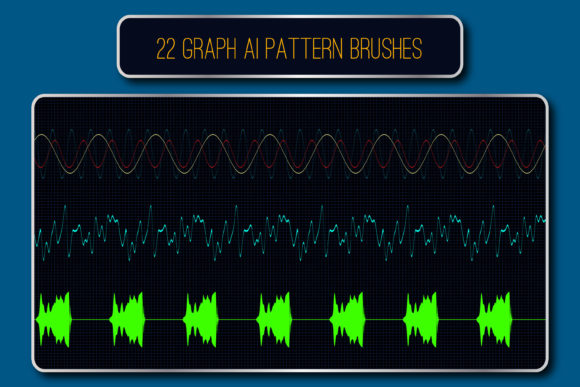
When you are designing for the tech sector, scientific fields, or futuristic branding, standard geometric shapes often feel static and uninspired. You need assets that imply movement, data flow, and energy. This is exactly where Oscillation Waves Illustrator Brushes come into play. These are not just simple lines; they are specialized design assets created to mimic the rhythmic patterns of audio impulses, sinusoids, and digital hesitations. As a creative font alternative for decoration, these brushes offer a unique way to frame content without relying on traditional typography.
The core appeal of this set lies in its ability to generate "endless" ribbons and friezes. Instead of drawing a static wave and trying to repeat it manually, these vector brushes allow you to create a path, and the brush automatically applies the oscillation pattern along that curve. This ensures consistency in the frequency and amplitude of the wave, which is crucial for achieving that polished, modern typography aesthetic. Whether you are working on logo design or packaging design, the visual personality of these brushes speaks a language of precision and innovation.
Practical Applications: From Web Design to Editorial Layouts
One of the biggest challenges in brand identity work is finding assets that work across different mediums. You might have a pattern that looks great on a website but falls apart in print. Because the Oscillation Waves Illustrator Brushes are provided in vector format (AI and EPS), they are resolution-independent. This makes them incredibly versatile for both digital and physical applications.
Consider web design and social media graphics. In these fast-paced environments, you have milliseconds to capture attention. Using these brushes to create dynamic borders or section dividers can guide the viewer's eye effectively. They add a layer of sophistication to data visualizations, tech blog headers, or podcast cover art. For editorial design, such as magazine layouts or annual reports, these patterns can replace standard serif font or sans serif font decorative elements, offering a fresh, scientific look to pull quotes or sidebars.
Furthermore, the inclusion of corner elements in five of the brushes is a practical detail that often goes unnoticed. When you are framing a certificate, a photo, or a text box, sharp corners can disrupt the flow of a sinusoidal pattern. These corner elements allow the wave to turn 90 degrees seamlessly, maintaining the integrity of the design. This level of detail elevates your work from amateur to professional, reinforcing brand perception and consistency.
Integrating Oscillation Waves into Your Design Workflow
Adopting new design assets should simplify your workflow, not complicate it. The setup for these brushes is straightforward. Once you load the library into Illustrator, you simply select the Paintbrush tool, draw your path, and apply the desired brush from the panel. The "hesitations" and "impulses" are pre-set into the brush definitions, saving you the time of manually adjusting anchor points to create that digital glitch effect.
Here is a practical tip for using these in logo design: Use the oscillation waves as a container for your logotype rather than just an underline. Because the brushes can be recolored and resized easily, you can create a "circuit board" effect where the wave wraps around the company name. This works exceptionally well for cybersecurity firms, audio engineering brands, or health tech startups.
Another valuable aspect is the ability to edit the source files. The package includes original files compatible with Illustrator CS5 and newer, as well as EPS 10 for legacy compatibility. If you are an experienced designer, you can open these files and tweak the frequency or amplitude of the waves to create a custom premium font decoration style that is unique to your client. This flexibility ensures that your commercial font and asset usage remains unique, avoiding the "cookie-cutter" look that plagues many stock resources.
Technical Considerations and Visual Hierarchy
While these brushes are powerful, they must be used with an understanding of visual hierarchy. Because they are high-contrast and visually complex, they can easily overpower body text if used too aggressively. They are best suited as display elements or structural decorations rather than backgrounds behind dense paragraphs.
When pairing these with typography, contrast is your friend. If you are using a bold, geometric sans serif font for your headlines, the organic flow of the oscillation waves can provide a nice counter-balance. Conversely, pairing them with a delicate script font or handwritten font can create a "tech-meets-human" aesthetic, which is very popular in the creator economy right now. The key is to ensure that the wave patterns do not compete with the legibility of your text.
For print projects like packaging design, pay attention to line weight. While you can adjust the thickness of the brushes, very thin oscillation waves might disappear on textured paper stock. Always print a test strip to ensure the rhythm of the wave translates well to the physical medium. The goal is to enhance the professionalism of the piece, not distract from the message.
Final Thoughts on Creative Utility
The Oscillation Waves Illustrator Brushes are more than just a set of lines; they are a toolkit for adding rhythm and energy to your creative projects. They bridge the gap between static illustration and dynamic motion graphics. For designers working in the HiTech or scientific niches, these assets are practically essential for maintaining a relevant and modern visual language.
By incorporating these into your library, you gain the ability to quickly generate complex decorative elements that would otherwise take hours to draw manually. Whether you are a freelancer looking to speed up your production time or a brand manager aiming to solidify a futuristic brand identity, these brushes offer a practical, high-quality solution. They are a prime example of how the right tool can transform a standard layout into an engaging visual experience. If you found this set useful for your workflow, rating the product helps other creators find quality assets in a crowded marketplace.