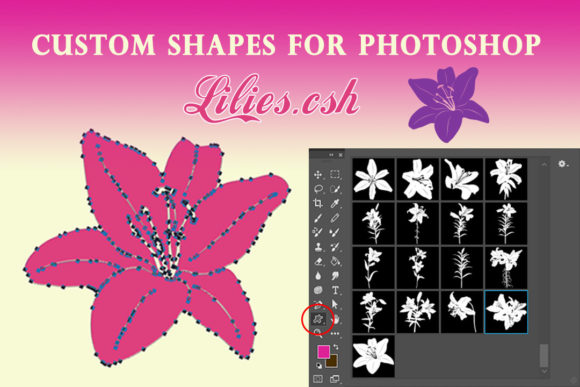
Flowers Lily Custom Shapes for Photoshop: A Designer's Secret Weapon
Every designer knows the frustration of searching for the perfect graphic element. You need something elegant, scalable, and ready to use. Flowers Lily Custom Shapes for Photoshop solves this problem beautifully. This collection of 17 lily shapes gives you vector-based design assets that maintain perfect clarity at any size. Whether you're building a brand identity or crafting social media graphics, these shapes offer practical versatility that raster images simply cannot match.
Understanding the Power of Vector Shapes in Modern Design
Custom shapes in Photoshop work differently than regular images. When you install the Flowers Lily set, you gain access to vector paths that behave like smart objects. Each lily shape exists as a fill layer with an associated vector mask. This means you can scale them from tiny icons to massive banners without losing sharpness. The outlines stay crisp. The angles remain precise. You can adjust individual nodes to modify the form, change colors instantly, and create unlimited copies across your canvas.
This flexibility matters for real projects. A marketing team might need the same lily motif at 50 pixels for a favicon and at 5000 pixels for trade show signage. With Flowers Lily Custom Shapes for Photoshop, both versions look equally polished. No pixelation. No blurry edges. Just clean, professional results every time.
Where These Floral Elements Shine Brightest
The applications extend far beyond simple decoration. Consider how these shapes enhance different creative contexts:
- Logo Design and Brand Identity: A single lily shape can anchor an entire visual identity. Florists, wellness brands, wedding planners, and luxury product lines often incorporate botanical elements. These vector shapes integrate seamlessly into logo design workflows, allowing precise color matching and consistent reproduction across all brand touchpoints.
- Editorial and Publishing Projects: Magazine layouts, book covers, and newsletter headers benefit from elegant floral accents. The shapes work as section dividers, background patterns, or standalone illustrations that complement modern typography choices.
- Packaging Design: Product packaging demands scalability. These lily shapes adapt to labels, boxes, bags, and tags without quality loss. Designers can create cohesive product lines by varying color palettes while maintaining consistent botanical motifs.
- Digital and Web Design: Website headers, email templates, and social media graphics gain sophistication through carefully placed floral elements. The vector nature ensures fast loading times and sharp display across retina screens and mobile devices.
- Personal and Craft Projects: Hobbyists creating invitations, greeting cards, scrapbook pages, or printable wall art find these shapes invaluable. The ability to customize colors and sizes means each project feels personally crafted rather than template-driven.
Practical Guidance for Integrating Lily Shapes Into Your Workflow
Adding Flowers Lily Custom Shapes for Photoshop to your toolkit requires minimal effort. The ZIP folder contains a .csh file that installs directly into Photoshop's shapes panel. Once loaded, you access all 17 variations from the custom shape tool. Here are practical recommendations for getting the most from this design asset:
- Test Color Variations Early: Before committing to a final palette, experiment with different fill colors on your lily shapes. Botanical elements often look dramatically different in muted earth tones versus vibrant jewel tones. Find what complements your existing brand identity or project aesthetic.
- Consider Scale and Context: A lily that works beautifully as a subtle watermark might feel overwhelming as a dominant header element. Place shapes at various sizes during your initial layout phase to evaluate visual hierarchy and balance.
- Explore Font Pairing Opportunities: Floral shapes pair naturally with certain typeface styles. Script fonts and handwritten fonts create romantic, organic compositions. Serif fonts offer classic elegance. Sans serif fonts provide modern contrast. Test combinations to discover what resonates with your target audience.
- Maintain Professional Consistency: When building brand materials, use the same lily shapes across all touchpoints. Consistency in botanical elements reinforces brand recognition and creates cohesive visual storytelling.
- Layer Thoughtfully: These shapes work beautifully as standalone elements, but they also layer effectively. Try combining multiple lily shapes with varying opacity levels to create depth and visual interest in backgrounds or decorative borders.
Real-World Impact on Brand Perception and Audience Engagement
Thoughtful design choices influence how audiences perceive your work. Floral elements like the Flowers Lily Custom Shapes communicate specific qualities: elegance, natural beauty, attention to detail, and sophistication. When incorporated consistently into marketing materials, these visual cues shape brand perception over time.
A small business using botanical accents in their social media graphics, website, and printed materials builds a recognizable aesthetic. Customers begin associating those visual elements with the brand experience. This recognition drives engagement, builds trust, and differentiates the business from competitors relying on generic stock imagery.
Professional designers understand that premium design assets save time while elevating quality. Instead of tracing floral illustrations from scratch or settling for low-resolution alternatives, having a reliable set of vector shapes streamlines the creative process. You spend less time on technical preparation and more time on strategic design decisions that serve your clients or your own business goals.
Final Thoughts on This Creative Resource
The Flowers Lily Custom Shapes for Photoshop collection represents practical design thinking. It delivers exactly what working designers and creators need: scalable, customizable vector elements that perform across diverse applications. From commercial branding projects to personal creative endeavors, these 17 lily shapes provide a foundation for countless design possibilities.
Consider how botanical elements might enhance your current projects. Whether you are refreshing a brand identity, designing seasonal marketing materials, or exploring new creative directions, having quality design assets at your fingertips makes the work more efficient and the results more professional. This collection, created by Svetlana, offers that practical value in an accessible format ready for immediate use.