Master the Watercolor Lion: A Procreate Sketch & Palette Guide
Why a Dedicated Palette Elevates Your Digital Art
Creating illustrations in Procreate becomes significantly more fluid and enjoyable when you remove the friction of color selection. Imagine sitting down to draw a majestic lion, only to spend half your time scrolling through the color wheel, testing swatches, and second-guessing your choices. That mental load breaks your creative flow. By using a pre-selected, themed color palette—specifically one designed for a watercolor aesthetic—you can dive straight into the artistic process. This approach is not just about saving time; it is about maintaining a consistent visual language throughout your artwork. For designers, hobbyists, and content creators alike, having a curated set of colors ensures that every piece you create feels cohesive and professionally styled.
Anatomy of the Watercolor Lion Sketch
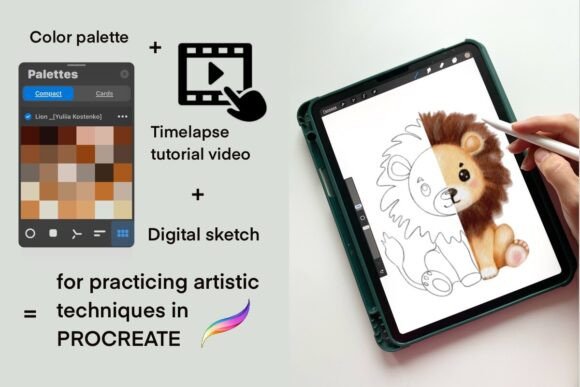
The foundation of this creative resource is a high-quality digital sketch of a lion provided in PNG format with a transparent background. This isn't just a rough outline; it’s a carefully crafted line art that captures the character and majesty of the animal while leaving plenty of room for your personal interpretation. The sketch style is loose enough to feel organic and artistic, yet defined enough to guide your coloring process perfectly. Because the background is transparent, you can easily layer this sketch over textured papers, custom backgrounds, or other design elements within your Procreate canvas. It serves as an excellent template for practicing shading, blending, and texture application without the pressure of drawing the anatomy from scratch.
Understanding the Included Color Palette
Alongside the sketch, you receive a dedicated color palette in the native Procreate `.swatches` format. This is where the magic of the watercolor style truly comes to life. The palette has been carefully selected to mimic the subtle, translucent quality of traditional watercolor paints. You will find colors that blend seamlessly, offering a range of warm and cool tones that work harmoniously together. This eliminates the guesswork of color theory, allowing you to focus on brushwork and composition. Whether you are aiming for a realistic look or a more stylized, graphic interpretation, the palette provides the perfect foundation for your creative decisions.
Learning Through Visual Demonstration
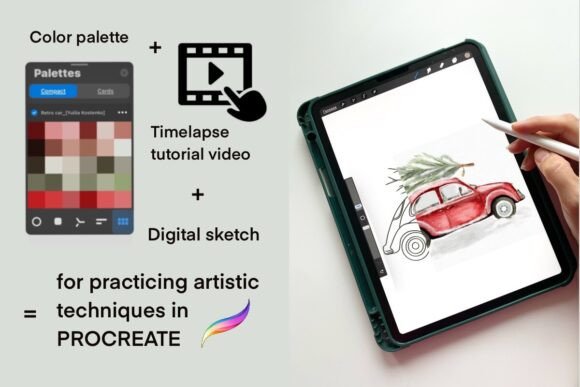
Sometimes, seeing a technique in action is the best way to learn. That’s why this collection includes a time-lapse video tutorial accessible via a link provided in a PDF file. Watching the process from start to finish offers valuable insights into how to approach the sketch, how to apply the colors from the palette, and how to build up layers to achieve depth. It’s an opportunity to observe brush settings, blending modes, and texture techniques that you can then apply to your own work. This video component transforms the package from a simple asset into a learning tool, helping you grow your skills in a relaxed, self-paced environment.
Practical Applications for Creators and Brands
This Watercolor Lion asset is incredibly versatile. For graphic designers and brand strategists, the lion sketch can serve as a powerful element in logo design, especially for brands aiming to convey strength, courage, or a natural aesthetic. The watercolor style adds a touch of authenticity and warmth, which can be particularly effective in packaging design for artisanal products or organic brands. Marketers and social media managers will find it useful for creating eye-catching graphics that stand out in crowded feeds. The unique texture of watercolor, combined with the bold subject of a lion, creates a visual hierarchy that naturally draws the viewer's eye.
Beyond commercial use, this resource is perfect for personal projects. Hobbyists can use it to practice their digital painting techniques, experiment with color mixing, and build confidence in their artistic abilities. Bloggers and content creators can incorporate the finished artwork into their website headers, blog post illustrations, or digital products like printable art. The ease of use—simply import the sketch, load the palette, and start painting—makes it accessible even for those who are new to digital illustration.
Getting Started: Installation and Setup
Setting up these assets is straightforward, but there is one important prerequisite: you must have the Procreate app installed on your iPad. Once you have the app, the process is simple. Upload the compressed file to the Downloads folder on your iPad using the Files app. From there, you can unzip the file. The key step is to tap on the `.swatches` file; Procreate will recognize it and automatically add it to your palette library. This seamless integration means you can go from downloading the file to painting in a matter of minutes. It’s a hassle-free way to expand your creative toolkit without complicated software installations or file management.
Final Thoughts on Creative Workflow
In the fast-paced world of digital content creation, tools that streamline your workflow are invaluable. The Watercolor Lion sketch and palette bundle is more than just a set of files; it’s a catalyst for creativity. By providing a structured starting point—a beautiful sketch and a harmonious palette—it removes barriers and allows you to focus on what matters: the art itself. Whether you are refining your technique for a client project or simply unwinding with a creative hobby, this resource offers a perfect blend of guidance and freedom. It’s a reminder that sometimes, the best way to unlock your creativity is to start with a little help from a well-designed toolkit.