Drawing Procreate Brushes: The Ultimate Sketching Toolkit
Every designer knows the frustration of a creative block, often exacerbated by a cluttered digital workspace. When inspiration strikes, you need tools that respond instantly, not a menu buried three clicks deep. This is where a curated Drawing Procreate Brushes set becomes more than just an asset; it becomes a workflow essential. This specific collection is engineered to consolidate the most fundamental tools of illustration—sketching, outlining, and shading—into a single, accessible location. It is designed for the modern creative who values efficiency without sacrificing the tactile quality of traditional media.
Emulating Traditional Media in a Digital Space
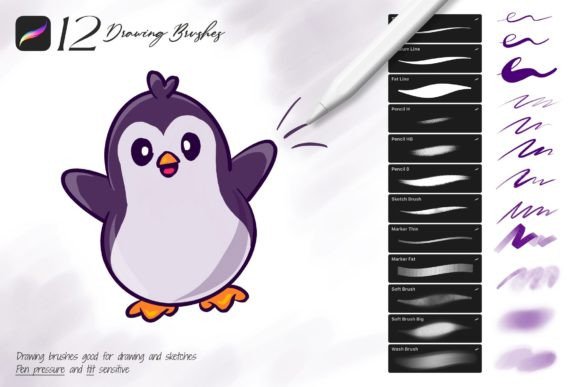
The primary appeal of the Drawing Procreate Brushes lies in their ability to bridge the gap between a glass screen and a paper canvas. The set includes three distinct pencil variations that offer varying degrees of hardness and texture. Unlike standard digital brushes that can feel sterile and uniform, these pencils feature advanced tilt and pressure sensitivity. This means the line weight changes dynamically based on how you hold your Apple Pencil, allowing for the kind of expressive mark-making found in traditional charcoal or graphite drawing. Whether you are drafting a rough composition or refining a detailed sketch, the responsiveness ensures your hand movements translate directly to the canvas with authentic grain and texture.
Complementing the pencils are the marker brushes, which are indispensable for color design sketches. These brushes lay down pigment with a semi-transparent quality that mimics real alcohol-based markers. When you layer strokes, the colors build up naturally, creating depth without the harsh digital edges often seen in standard airbrush tools. This feature is particularly valuable for packaging design mockups or fashion illustration, where visualizing color blocking quickly is crucial. The ability to see how colors interact in real-time allows for faster decision-making in the early stages of a project.
Practical Applications for Professionals
For the entrepreneur or small business owner, visual assets are currency. However, commissioning custom illustrations for every social media post or blog header is rarely feasible. The Drawing Procreate Brushes empower you to create your own graphics with a professional aesthetic. The set includes three specific "Soft Brushes" designed exclusively for shadows and shading. In logo design and brand identity work, adding subtle depth can transform a flat icon into a memorable mark. These soft brushes allow you to apply gradients and shadows that give your illustrations a 3D quality, enhancing the professional perception of your brand without requiring advanced 3D modeling skills.
Furthermore, the inclusion of three dedicated outline brushes addresses the need for clarity in editorial design and web design. Clean lines are the backbone of legibility, especially when creating infographics or instructional graphics for digital platforms. These outline brushes maintain a consistent weight while retaining a hand-drawn charm, making them perfect for content creators who want to add a personal touch to their educational materials. They offer a handwritten font aesthetic in illustration form, ensuring that your visual content feels approachable and human.
Optimizing Your Creative Workflow
One of the most significant advantages of this collection is the optimization of your digital workspace. Procreate is a powerful tool, but its default library can be overwhelming. By installing the Drawing Procreate Brushes set, you effectively curate a "top drawer" of essentials. This eliminates the time spent scrolling through hundreds of irrelevant options. The brushes are categorized logically: pencils for structure, markers for color, soft brushes for volume, and outlines for definition. This organization mirrors the physical artist's desk, where tools are kept within arm's reach.
Customization is another key feature. While the brushes are tuned for performance out of the box, they are fully editable. You can adjust the opacity, streamlining, and jitter settings to match your specific hand pressure or artistic style. This flexibility makes the set suitable for a wide range of disciplines, from modern typography lettering to complex character design. It is not a rigid "one-size-fits-all" solution but a malleable toolkit that adapts to your unique creative voice.
Compatibility and Integration
It is vital to note the ecosystem requirements for these tools. The Drawing Procreate Brushes are native to the Procreate application for the Apple iPad. They are engineered specifically to utilize the Apple Pencil's hardware capabilities, which is why they will not function in Adobe Photoshop or other desktop-based graphic editing software. This exclusivity ensures maximum performance and stability within the iOS environment. Installation is streamlined for efficiency; downloading the file and clicking the "Drawing_[by_Sko4].brushset" file automatically installs the entire library into your Procreate brush list, ready for immediate use.
Ultimately, the value of these brushes lies in their ability to remove technical barriers. When your tools behave predictably and intuitively, your focus shifts from "how to draw" to "what to draw." Whether you are a content creator needing quick visuals for a blog, a designer sketching out a new brand identity, or a hobbyist exploring digital art, this set provides the foundational infrastructure for high-quality creative output. It transforms the iPad from a consumption device into a production powerhouse, enabling you to sketch, paint, and design with the fluidity of traditional media and the versatility of digital technology.