Decorative Lines Brush for Procreate: Beyond Simple Borders
If you are anything like me, your digital toolkit is a mix of utility and aesthetics. We need tools that work hard, but they also need to look good while doing it. When I first picked up the Decorative Lines Brush for Procreate, I wasn't just looking for a way to draw a straight line; I was looking for a way to add texture, rhythm, and a bit of personality to my layouts without spending hours tweaking anchor points in a vector program.
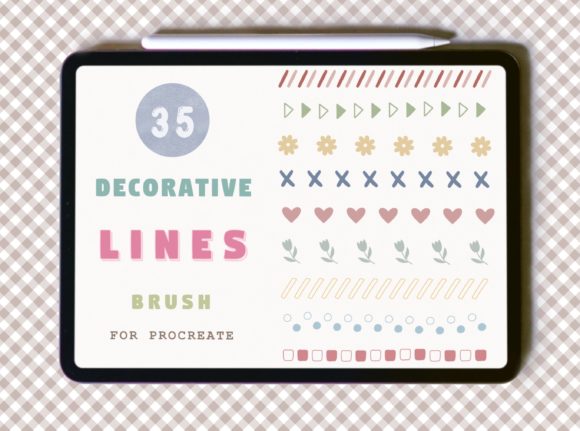
Let’s be honest, drawing a perfect decorative border by hand is tedious. Even with a steady hand and a grid, the consistency is rarely there. This set of 35 brushes solves that specific headache. It is not just a collection of strokes; it is a curated library of visual separators. From delicate, dotted trails to bold, textured bars, these brushes give you the ability to frame text, separate sections, and add that "finished" look to your digital planners, social media quotes, or brand presentations.
The Anatomy of the Set: More Than Just Lines
When you open this collection, you will notice immediately that these aren't your standard vector paths. There is a tactile quality to them. Because they are designed specifically for the iPad environment, they mimic the behavior of physical media—perhaps a soft charcoal, a thick acrylic, or a fine liner—depending on which of the 35 variations you select. This brings a human element to your digital work, which is crucial in an era where audiences crave authenticity.
The versatility here is the real selling point. You can use these in any color or opacity, and they can be resized to best fit your art. This flexibility means you aren't locked into a specific "look." A single brush stroke that works as a bold header divider in a 4000px wide canvas can be scaled down to become a subtle footnote separator in a smaller graphic. The ability to control opacity also allows you to create depth. You could layer a solid line over a textured one with reduced opacity to create complex, multi-dimensional borders that look like they belong in a premium font presentation.
It is worth noting the technical specifics: these stamps were made specifically for Procreate and will not work with any other program. They have only been tested with an Apple Pencil, however, they do not use pressure sensitivity, so another stylus may work. This makes them accessible even if you are using a third-party stylus, though the Apple Pencil offers the most seamless experience.
Strategic Application: Where These Brushes Shine
As a designer or content creator, you are constantly managing visual hierarchy. You need to tell the viewer’s eye where to go next. This is where the Decorative Lines Brush for Procreate becomes an indispensable part of your design assets. Here is how I recommend using them across different mediums:
1. Brand Identity and Logo Design
When developing a brand identity, consistency is king. If your brand personality is playful, organic, or hand-crafted, clean vector lines can sometimes feel too sterile. Using these brushes to create borders or underlines for your logo design elements can soften the look. Imagine a handwritten font paired with a textured, hand-drawn line underneath the brand name. It creates a cohesive "stamp" effect that feels bespoke and high-end.
2. Social Media Graphics and Content Creation
For the marketer, blogger, or influencer, the feed is the portfolio. Uniformity in your social media graphics keeps people swiping. These brushes are perfect for creating consistent frames around your quotes or separating your caption text from your hashtags visually. Because you can change the color instantly, you can match the border to the dominant color of your photo, creating a seamless aesthetic that boosts audience engagement.
3. Editorial and Web Design
If you are mocking up a website or designing a magazine layout, these brushes add a layer of modern typography flair. In web design, we often use lines to separate the header from the body content. Instead of a generic 1px solid CSS border, use a textured brush stroke in your mockup to show the client how the site will "feel." It demonstrates a higher level of care in the editorial design phase. It helps establish a visual rhythm that guides the reader through long-form content.
4. Packaging and Print
For packaging design, especially in the artisan or food sector, the label needs to look tangible. These brushes are excellent for creating "burst" lines, strikethroughs, or ribbon effects on labels. They add a retro or hand-made vibe that suggests the product inside is crafted with care, directly influencing the consumer's perception of quality.
Integrating with Typography and Layout
One of the most common questions I get about creative font usage is how to pair decorative elements with text. The Decorative Lines Brush for Procreate acts as a bridge between your typography choices. For example, if you are pairing a bold serif font with a delicate sans serif font, the transition can sometimes feel jarring. A decorative line placed between them acts as a visual palate cleanser.
Think about font pairing in terms of weight and texture. If you are using a very heavy, blocky font, a fine, dotted line might get lost. Conversely, if you are using a light, airy script font, a heavy textured bar might crush the delicate descenders. The variety in this 35-piece set ensures you have the right tool for the job. You have the heavy hitters for bold statements and the subtle strokes for elegant separation.
Furthermore, consider the psychological impact. Lines create order. They tell the reader, "This section is done, now look here." In a busy layout, these brushes provide breathing room. They manage the white space effectively, ensuring your professional designs don't look cluttered.
Practical Tips for Best Results
To get the most out of this digital product, keep these practical tips in mind:
- Color Harmony: Don't just use black or white. Sample a color from the shadow of your subject matter to create a harmonious line that blends naturally into the scene.
- Layering: Don't be afraid to duplicate a line layer, change the color of the bottom layer, and offset it slightly. This creates a drop-shadow effect that adds pop to your graphics.
- Masking: Use these lines in conjunction with clipping masks. You can place a watercolor texture layer on top of your line (clipped to it) to give the line a painted-on-fabric feel.
Remember, this is a digital product. Your download includes 1 .brushset file in a ZIP file containing the 35 lines of brush. Once imported into Procreate, they are ready to go. There is no subscription fee and no hidden costs—just a one-time addition to your creative arsenal.
Whether you are a small business owner creating your own flyers, a crafter designing digital stickers, or a publisher laying out a book cover, these lines offer a simple way to elevate your work from "homemade" to "professionally designed." They save time, ensure consistency, and add that tactile warmth that modern digital art often lacks. Give them a try in your next project; you might be surprised at how much a simple line can change the composition.